The manager behind the card game
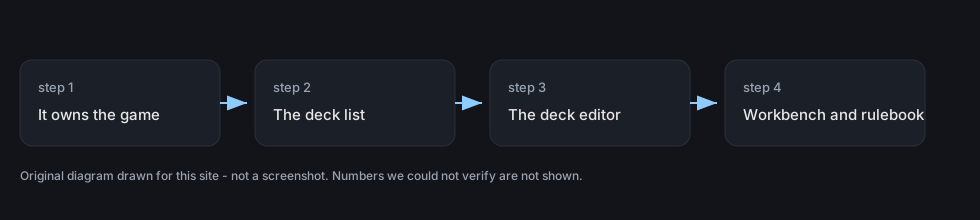
The card game in TCG Card Shop Simulator hangs off a manager of its own: it holds the table game, the deck list screen, the deck editor, a workbench screen and the rulebook screen, so playing, building and reading the rules all run through one place.
No confirmed picture from the game yet. This subject is kept as a note for now: the facts below are verified against the game's own files, but no image has been confirmed for it, so it is not published as a finished entry and is kept out of search engines.
What the game establishes
- The card game has a manager that holds the table game itself.
- It holds the deck list screen.
- It holds the deck edit screen.
- It holds a workbench screen.
- It holds the rulebook screen.
In play
Playing cards is not a set of disconnected screens. There is a manager behind the card game, which is why the table, the decks and the rules can refer to one another rather than each being opened from the shop menu.
It holds the game itself. The manager refers to the table game, so a match is something the card-game side owns rather than something the shop starts.
It holds the deck list. The screen that shows what a crew has built belongs to the manager, which is why the list of decks is available where the game is played.
It holds the editor as well. Building and changing a deck is a screen of its own under the same manager, so a deck can be changed without leaving the card-game side of the shop.
There is a workbench screen. That is a separate screen again, which is why assembling something for play is not the same as editing a list of cards.
And it holds the rulebook. The screen that teaches the rules sits with the rest, so the rules and the game are kept together rather than the rulebook being a shelf item you have to find.
What this entry does not tell you: how many decks can be kept, what the workbench does in detail, or how a match is started. We have not verified those numbers, so we do not print them.